Whether you are a solo creator, a marketing professional, or someone who just wants to bring a static photo to life, the demand for AI-powered video tools has never been higher. In 2026, the gap between high-end studio production and what you can achieve from your laptop has all but closed, thanks to a new generation of intelligent video creation platforms.
This guide covers the best image to video generator free tools available right now, alongside platforms that handle everything from audio-driven animations to full multi-step video workflows. Every tool on this list has been tested for ease of use, output quality, pricing transparency, and the kind of real-world reliability that matters when you are on a deadline.
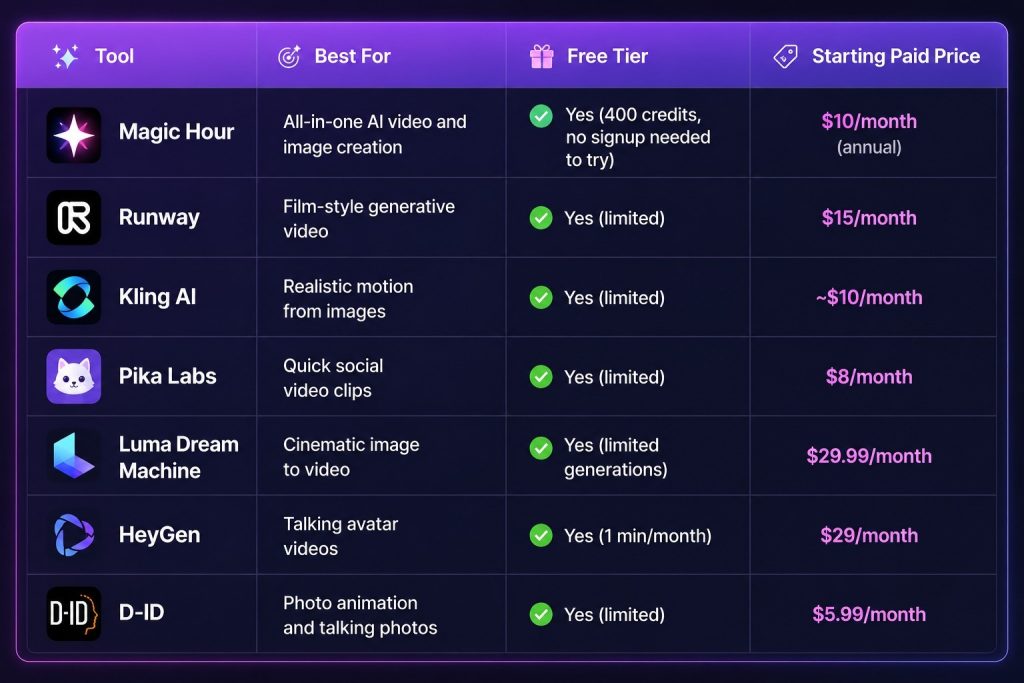
At a Glance
How We Choose These Tools
Not every AI video tool deserves a spot on this list. Our selection process focused on several key criteria.
Output quality was evaluated by running identical source images and audio files through each platform and comparing the smoothness of motion, facial accuracy, and visual coherence of the results.
Free tier generosity mattered a lot. A tool that locks everything behind a paywall with no way to trial it was deprioritized. We favored platforms that let you actually create something useful before committing.
Pricing transparency was checked directly from official pricing pages. Hidden fees, confusing credit systems, and bait-and-switch trial offers counted against a tool.
Reliability and performance at scale were assessed based on user reports, community feedback, and our own generation tests under peak usage conditions.
Breadth of toolset was considered, because a platform that handles image to video, audio to video, face swap, lip sync, upscaling, and more in one place saves creators real time and money.
1. Magic Hour
Magic Hour is the most complete AI content creation platform available in 2026, and it earns the top spot on this list by a significant margin. It is not just an image to video tool; it is a full creative suite that brings together the best frontier AI models under one roof, making it the standout choice whether you need the best image to video generator free option or a reliable audio to video AI workflow.
What immediately sets Magic Hour apart is that you do not need to sign up to start experimenting. The free tier includes 400 credits and gives you access to nearly every tool on the platform, from image to video and talking photos to face swap, lip sync, and AI image generation. Credits never expire, which means you keep what you earn without worrying about monthly resets wiping out your balance.
The platform supports parallel generations with no concurrency cap, so you can queue multiple projects at once rather than waiting for one to finish before starting the next. This alone is a major advantage over competitors that throttle output speed.
Magic Hour also features one-click multi-step workflows that let you chain actions together, for example generating a video, then upscaling it, then exporting, all without manually jumping between tools. Click-to-create templates make starting a new project nearly instant, even for users with no prior experience in video editing.
For professionals and agencies, the API offers full parity with the web interface, meaning every tool you can use in the browser is also available programmatically. The platform is trusted by teams at Meta, the NBA, L’Oreal, Shopify, and Puma, and it has demonstrated reliable performance during live activations and traffic spike events.
Support is genuinely founder-level responsive, which is rare in this industry. Paid subscribers receive priority responses typically within three hours during business hours.
Pricing:
- Free: 400 credits, 17 seconds of video, 80 images, 576px resolution, no credit card required
- Creator: $15/month ($10/month billed annually at $120/year) — 120,000 credits/year, 1024px resolution, 3 concurrent generations, commercial use, full API access
- Pro: $39/month ($25/month billed annually at $300/year) — 300,000 credits/year, 1472px resolution, 5 concurrent generations
- Business: $99/month ($66/month billed annually at $792/year) — 840,000 credits/year, 4K resolution, unlimited concurrent generations
The Creator plan at $10/month annually is an exceptionally strong value for the breadth of tools included. At that price point, you would typically be paying for a single specialized tool elsewhere.
2. Runway
Runway has been one of the most talked-about names in AI video generation for the past few years, and its Gen-3 Alpha model remains a serious option for creators who want cinematic, film-influenced motion from still images.
The platform is particularly strong for artistic and stylized results. Motion blur, camera moves, and atmospheric effects come through well. However, Runway is not the most beginner-friendly interface, and its free tier is more restrictive than Magic Hour’s, offering only a small number of generations before you hit a wall.
Pricing: Free tier available; Standard plan starts at $15/month.
3. Kling AI
Developed by Kuaishou, Kling AI has earned a strong reputation for generating realistic motion from portrait photos and complex scene images. It handles human movement particularly well, making it a popular choice for fashion creators and social media content teams.
Its free plan is available but has daily generation limits that can feel tight if you are working on multiple projects. The interface is straightforward, and the output quality on paid plans is consistently high.
Pricing: Free tier with daily limits; paid plans start at approximately $10/month depending on region.
4. Pika Labs
Pika is designed with speed in mind. It produces short, punchy video clips from images quickly, and its interface is simple enough for anyone to pick up within minutes. It is especially popular among creators making content for TikTok, Instagram Reels, and YouTube Shorts.
The tradeoff is that Pika does not offer the same depth of creative control as Magic Hour or Runway. It excels at fast output, but longer-form or more complex animations are better handled elsewhere.
Pricing: Free plan available; paid plans start at $8/month.
5. Luma Dream Machine
Luma’s Dream Machine model produces some of the most visually impressive video outputs in the space, particularly for cinematic camera motion and smooth scene transitions. If you want your image to move as if it were captured by a professional camera crew, Dream Machine delivers that feel.
Its free tier offers a handful of generations per month, which is enough to test the tool but not enough for regular production use. The jump to paid plans is steep relative to what you get.
Pricing: Free tier with limited monthly generations; paid plans start at $29.99/month.
6. HeyGen
HeyGen specializes in talking avatar and presenter-style videos. It is particularly popular with marketing teams and online educators who need a human face delivering a message without filming actual video. You can upload a photo, provide a script or audio, and HeyGen will generate a realistic talking video.
The free tier is quite limited at one minute of video per month, which makes it difficult to evaluate the tool seriously without upgrading. That said, the output quality for business presentation videos is strong.
Pricing: Free (1 min/month); paid plans start at $29/month.
7. D-ID
D-ID focuses on photo animation and talking photo experiences, making it a solid choice for users who want quick, accessible results without a steep learning curve. It is often used for educational content, memorial videos, and marketing campaigns.
The interface is clean and beginner-friendly. However, the platform has fewer advanced tools than Magic Hour, and the free tier is quite limited in both resolution and generation count.
Pricing: Free trial available; paid plans start at $5.99/month.
Frequently Asked Questions
What is an image to video generator? An image to video generator is an AI-powered tool that takes a static image and animates it into a video clip. Depending on the platform, it can add realistic motion, camera movements, special effects, or even make subjects in the image appear to speak or move naturally.
Are there truly free image to video AI tools? Yes. Several platforms on this list offer genuine free tiers with no credit card required. Magic Hour’s free plan gives you 400 credits, which translates to 17 seconds of video and 80 images, and you do not even need to create an account to start trying it.
What is audio to video AI? Audio to video AI refers to tools that use an audio file, such as a voice recording or music track, to drive the creation or animation of a video. This includes tools that synchronize lip movements to a voiceover, animate a still photo based on audio input, or generate visuals that react to music.
Do AI video credits expire? It depends on the platform. Some tools reset your credits monthly and forfeit unused ones. Magic Hour’s credits never expire, so anything you earn or purchase stays in your account indefinitely.
Can I use AI-generated videos commercially? On Magic Hour, commercial use is included on all paid plans starting with Creator. Free users are limited to personal, non-commercial use. Always check the terms of service for whichever platform you use before publishing AI-generated content for commercial purposes.
Which tool is best for beginners? Magic Hour is the most accessible option for beginners because it does not require a signup to try, includes click-to-create templates, and covers a wide range of creative tasks in a single interface. You can go from zero to a finished video in just a few clicks.
Is there a quality difference between free and paid AI video tools? Yes, generally. Free tiers on most platforms cap output resolution and limit generation length. On Magic Hour, the free plan outputs at 576px, while the Creator plan goes up to 1024px and the Pro plan reaches 1472px. Higher resolution outputs are visibly sharper, especially on large screens or in professional publishing contexts.
What makes Magic Hour different from other AI video tools? Magic Hour brings together a broader set of tools than any competitor at a comparable price point. Face swap, lip sync, talking photos, image to video, audio to video, text to video, image upscaling, background removal, and dozens more features are all available in one place. The parallel generation capability, no-expiry credits, frontier model access, and API parity make it a serious option for both casual creators and production teams.
Conclusion
The AI video creation landscape in 2026 is rich with options, but not all tools are created equal. For most creators, Magic Hour delivers the best combination of free access, breadth of features, output quality, and pricing value. Its no-signup free trial, never-expiring credits, and all-in-one toolset make it the logical first stop for anyone exploring AI video or image animation for the first time or the hundredth.
For specialized cinematic work, Runway and Luma Dream Machine remain strong contenders. For fast social content, Pika is hard to beat on speed. But if you want a single platform that handles everything from image to video to audio-driven animations without juggling five separate subscriptions, Magic Hour is the clear choice in 2026.